BookYourPTO Intelligence: Your AI HR Assistant
Meet the AI HR assistant built into BookYourPTO: ask about leave, expenses and schedules in plain words, and approve every change before it happens.
The work around the work
Most of the time spent in an HR tool is not spent on decisions. It is spent finding the screen that holds the answer: which balance, which report, which week of the rota, which claim is still waiting on someone. The decision — yes, approve it; no, move it to Friday — takes a second. Getting to it takes five clicks and a filter.
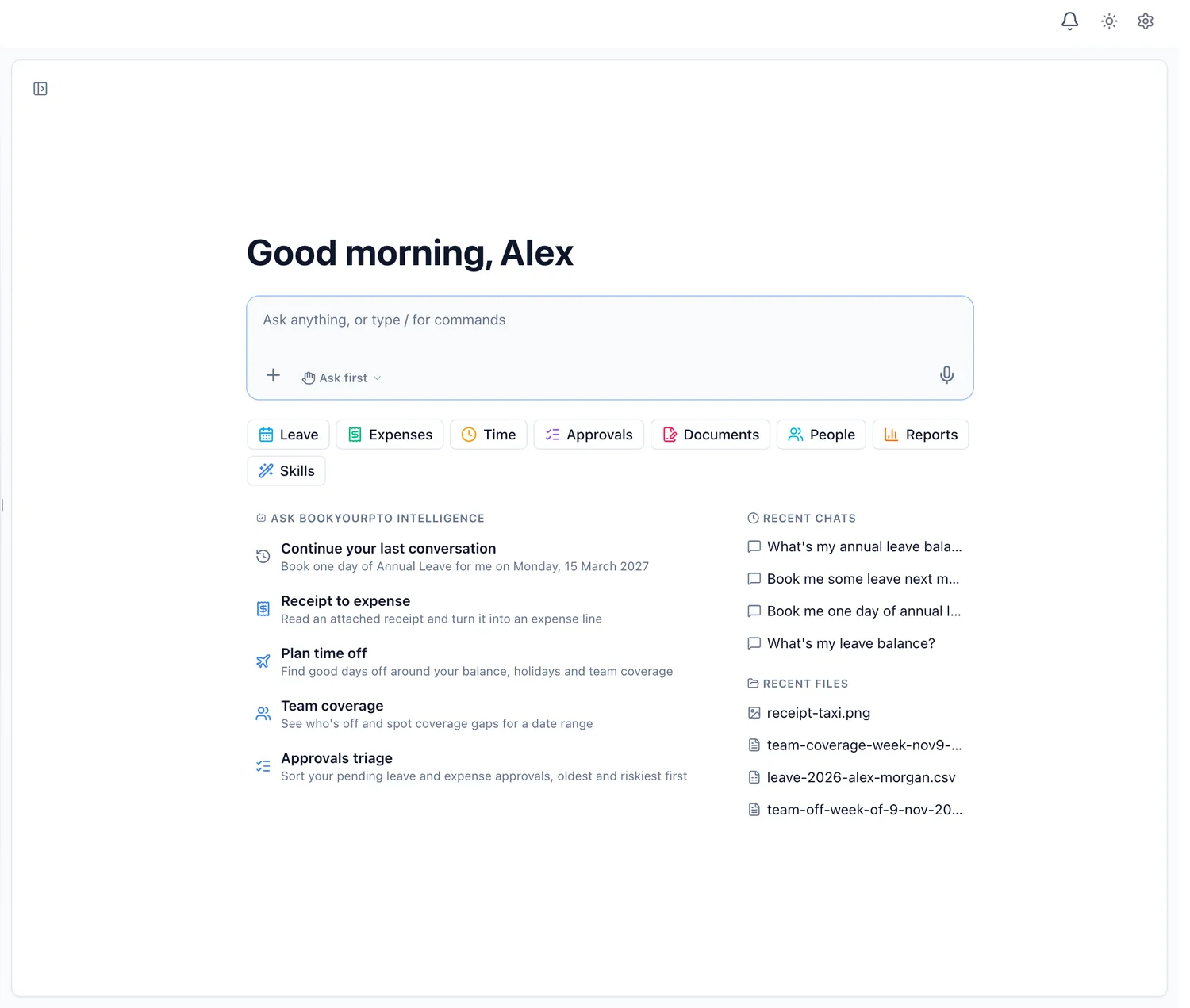
BookYourPTO Intelligence is an assistant built into BookYourPTO for exactly that part. You ask in plain language. It looks the answer up in your organization's records, or prepares the change you asked for and shows it to you before anything happens. That is the difference between an assistant and a help-desk bot, which we explain in HR chatbot vs AI HR assistant.
What you can ask it
A few of the jobs it is shaped for:
- "Who's off this week?" — a table of who is away, their leave type and dates, and whether there are public holidays to account for.
- "Add this receipt to my expenses." — attach a photo or PDF of a receipt and it reads the vendor, date, tax and total, creates the expense report with the receipt attached, and leaves it as a draft until you submit it.
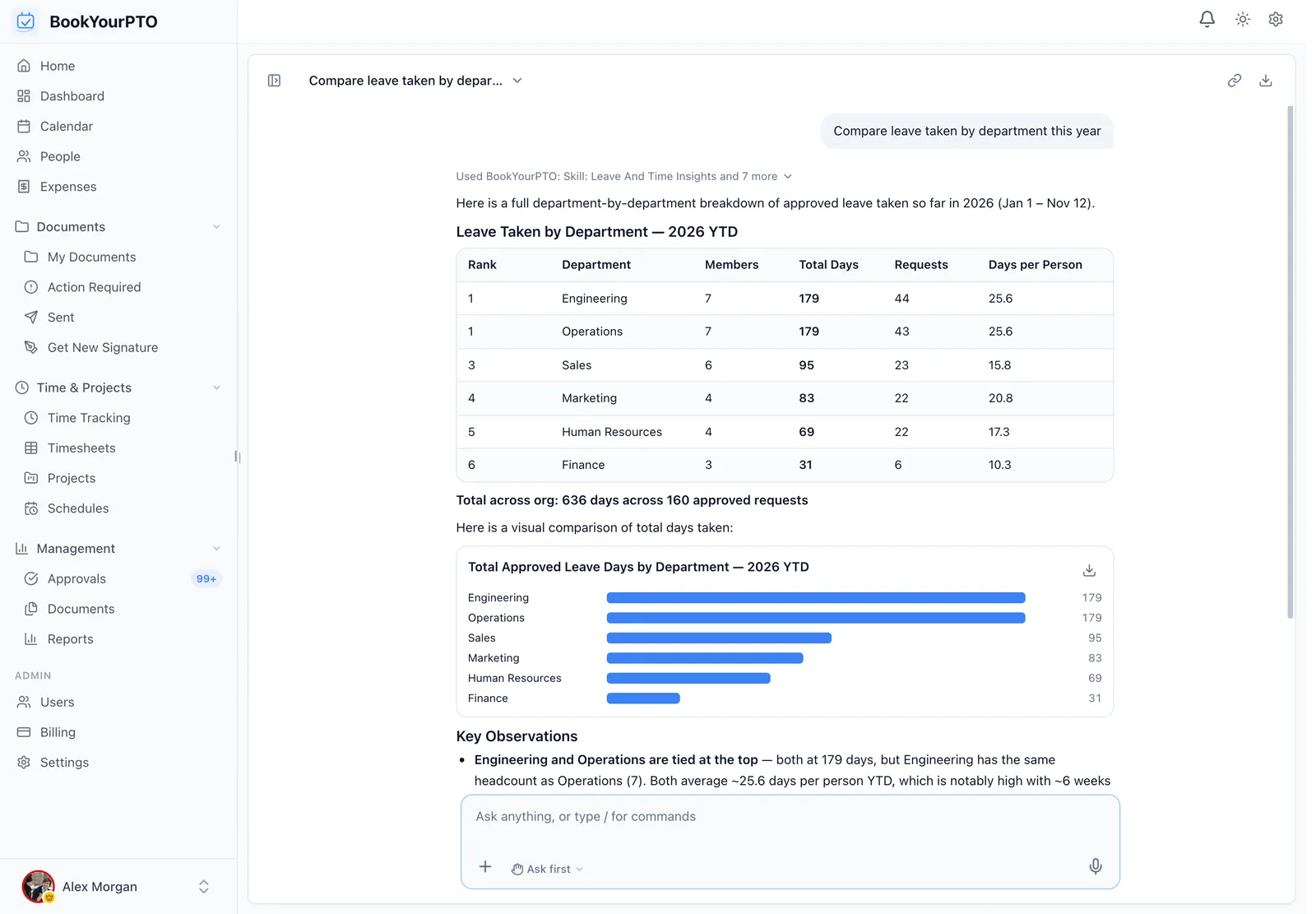
- "Compare leave taken by department this year." — a table and a chart drawn from the numbers it looked up, which you can download as a CSV or a PDF.
- "Find me a good week off in the spring." — it weighs your balance, public holidays and who else is away.
- "Set Abigail's shifts for next week to 08:30–16:30." — for managers, a week of shifts in one line. It checks whether the week is already published and asks before changing one that is.
It also covers time tracking and timesheets, documents waiting for your signature, training and certifications coming due, goals and 1:1s, onboarding and the org chart. If your organization has switched Time tracking or Expenses off, the assistant stops offering them too, the same way the sidebar does.
Managers get ready-made skills for the jobs they repeat: approvals sorted oldest and riskiest first, coverage gaps for a date range, where each new hire's onboarding stands, and leave and timesheet trends.
It works as you, and only as you
The assistant is not a second door into your data with its own rules. Every lookup and every change goes through the same sign-in and the same permission checks as the app itself. An employee's assistant sees what that employee can see. A department head's stays within what a department head can reach. Some things are never offered at all, whoever is asking: billing, sign-in and security settings, API tokens, and creating users or changing their roles. For those, it points you to the right settings page.
Nothing changes until you approve it
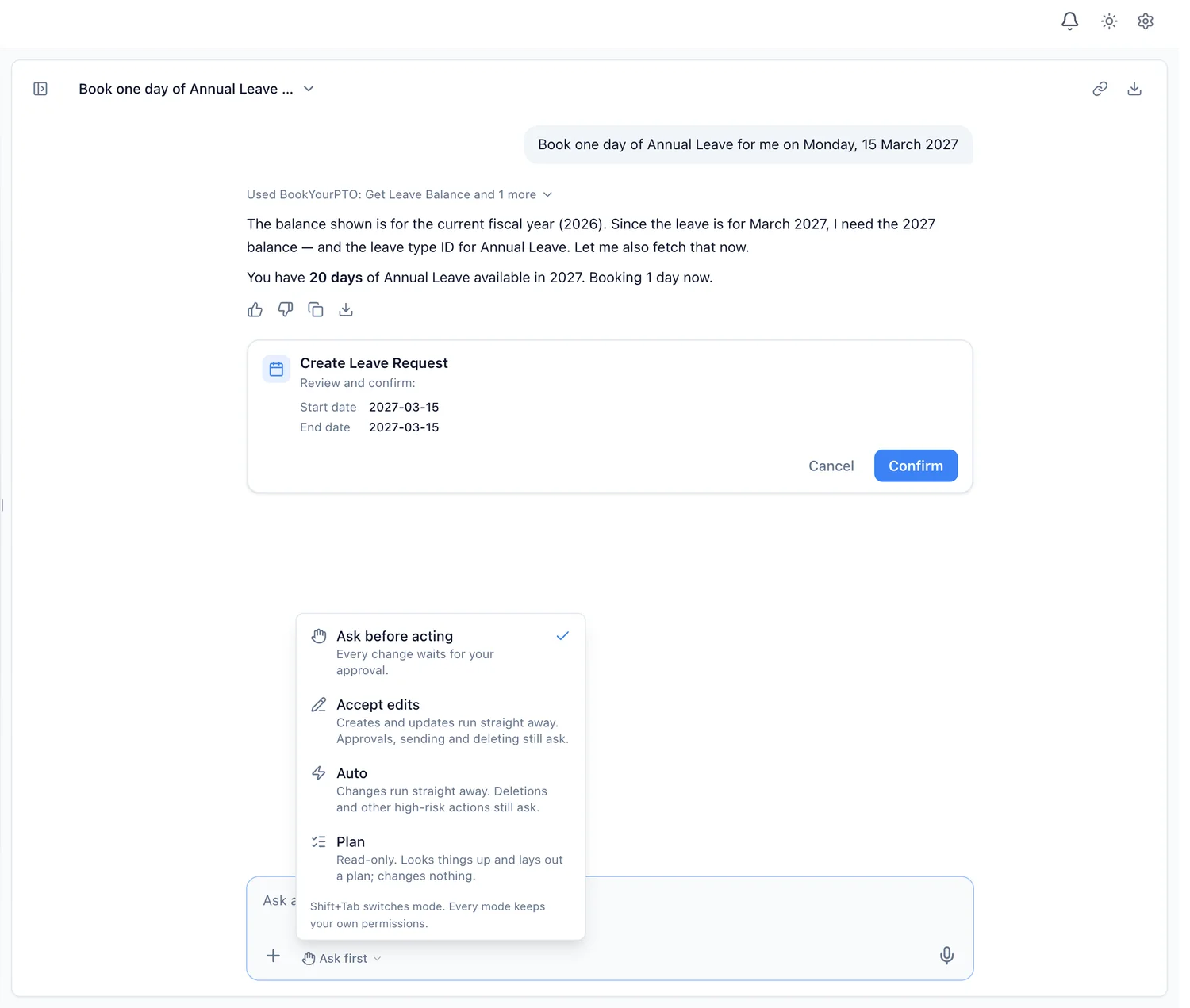
When you ask for a change — book a day off, submit a timesheet, approve a claim — the assistant prepares it and shows you a card with the details and two buttons, Cancel and Confirm. Nothing is written until you confirm.
That is the default mode, Ask before acting. You can choose how much it does on its own:
- Ask before acting — every change waits for your approval.
- Accept edits — creates and updates run straight away; approvals, sending and deleting still ask.
- Auto — changes run straight away; deletions and other high-risk actions still ask.
- Plan — read-only. It looks things up and lays out a plan, and changes nothing.
Whatever the mode, high-risk actions — deleting, revoking, archiving, anything in bulk — always ask first.
Privacy, memory and control
- Your conversations are not used to train AI models. They are kept so you can come back to them, and so the assistant can improve inside BookYourPTO — for example from the thumbs up or down you give an answer.
- It remembers only what you ask it to. Say "remember that I work Monday to Thursday" and it keeps that fact. Type
/memoryto see everything it remembers and delete any of it. - Your organization decides who has it. In Settings > Intelligence, administrators and executives can switch it off for a department or a person, and see how much each person uses it — counts only, never what was asked.
- Misuse is recorded. Attempts to extract secrets, passwords or another organization's data are refused and recorded as security violations for your administrators to review.
Where to find it
Open it from the top of any page in BookYourPTO and it slides in beside your work, or expand it into a full page with your past chats, your files and your usage. On a phone it opens full screen in the browser.
Plans
Asking questions is included on every plan, including Free. Taking actions — booking leave, filing expenses, approvals, schedules and the rest — is included on Pro, Business and Enterprise. Each person has included usage that resets weekly, shared out across shorter sessions, and the allowance grows with your plan.
BookYourPTO Intelligence is in beta, and we are adding to what it can do. See what it does, read what to look for in AI HR software, or start free and ask it your first question.
Written by
AnHourTec Team